Brand overview
What Keychron does well—and where it fits
Keychron sells mechanical, magnetic, low-profile, ergonomic, split, compact, full-size, and ultra-slim keyboards, along with mice, number pads, switches, keycaps, cables, palm rests, cases, and customization software.
- Product families range from affordable B-series keyboards to full-metal Q-series custom boards
- Mechanical, low-profile, and magnetic-switch options serve different typing and gaming needs
- 2.4GHz, Bluetooth, and USB-C connectivity on many current products
- Keychron Launcher supports remapping, macros, lighting, layers, and HE functions
- Mac, Windows, Linux, ANSI, ISO, and selected JIS options across the wider catalog
Keychron product lineup
The 4 standout products in this brand review
These products show how the brand performs across different needs and price points. Each receives its own rating, price reference, strengths, limitations, and offer link.
Best premium custom keyboard
Keychron Q1 Max QMK/VIA Wireless Custom Mechanical Keyboard
by Keychron

Best for: Programmers, writers, creators, and keyboard enthusiasts who want a premium 75% aluminum board for a permanent desk setup
A 75% full-metal wireless custom keyboard with a CNC aluminum case, double-gasket structure, acoustic foam, hot-swap PCB, rotary knob, and QMK/Launcher programming.
Our review
The Q1 Max represents Keychron's premium desktop experience. Its heavy aluminum construction, acoustic layers, PBT keycaps, screw-in stabilizers, and 1,000Hz 2.4GHz mode are aimed at users who care about typing feel and customization. It is less suitable for frequent travel because the metal chassis is heavy, and the final price depends on assembled, barebone, color, keycap, and switch choices.
What stands out
- Full CNC-machined aluminum body
- 2.4GHz, Bluetooth 5.1, and USB-C wired connectivity
- Hot-swappable MX-style switch support
- Double-gasket structure and multiple acoustic layers
Keep in mind
- Heavy and inconvenient for regular travel
- More expensive than mainstream plastic keyboards
- Barebone version excludes switches and keycaps
- Typing sound and feel remain switch- and configuration-dependent
- Layout
- 75% compact with rotary knob
- Case
- CNC-machined 6063 aluminum
- Connectivity
- 2.4GHz, Bluetooth 5.1, and USB-C
- Polling rate
- 1,000Hz in 2.4GHz and wired modes
- Battery
- 4,000mAh; up to 180 hours with backlight off
Affiliate link. We may earn a commission at no extra cost to you.
Best magnetic gaming pick
Keychron K2 HE Wireless Magnetic Switch Keyboard
by Keychron

Best for: Gamers and advanced users who want adjustable actuation and rapid-trigger features without giving up wireless multi-device support
A 75% wireless magnetic-switch keyboard with adjustable actuation, rapid trigger, analog mode, multiple actions per key, and Keychron Launcher configuration.
Our review
The K2 HE combines a familiar compact layout with magnetic-switch functions normally aimed at competitive gaming. Users can adjust actuation between 0.2 and 3.8mm, configure rapid trigger, and assign several actions according to press depth. The special edition's wood accents create a distinctive desk appearance, but switch replacement is limited to the compatible Gateron double-rail magnetic system.
What stands out
- Adjustable 0.2–3.8mm actuation with 0.1mm sensitivity
- Rapid trigger, analog mode, and multi-action keys
- 1,000Hz 2.4GHz and wired polling
- Bluetooth multi-device support plus USB-C
Keep in mind
- Magnetic switch compatibility is model-specific
- Advanced features require setup in Launcher
- 75% layout omits a number pad
- Special edition styling may not suit every workspace
- Layout
- 75% compact
- Switch type
- Gateron double-rail magnetic
- Actuation
- Adjustable from 0.2 to 3.8mm
- Connectivity
- 2.4GHz, Bluetooth, and USB-C
- Battery
- 4,000mAh; up to 110 hours published
Affiliate link. We may earn a commission at no extra cost to you.
Best productivity mouse
Keychron M6 Wireless Mouse
by Keychron
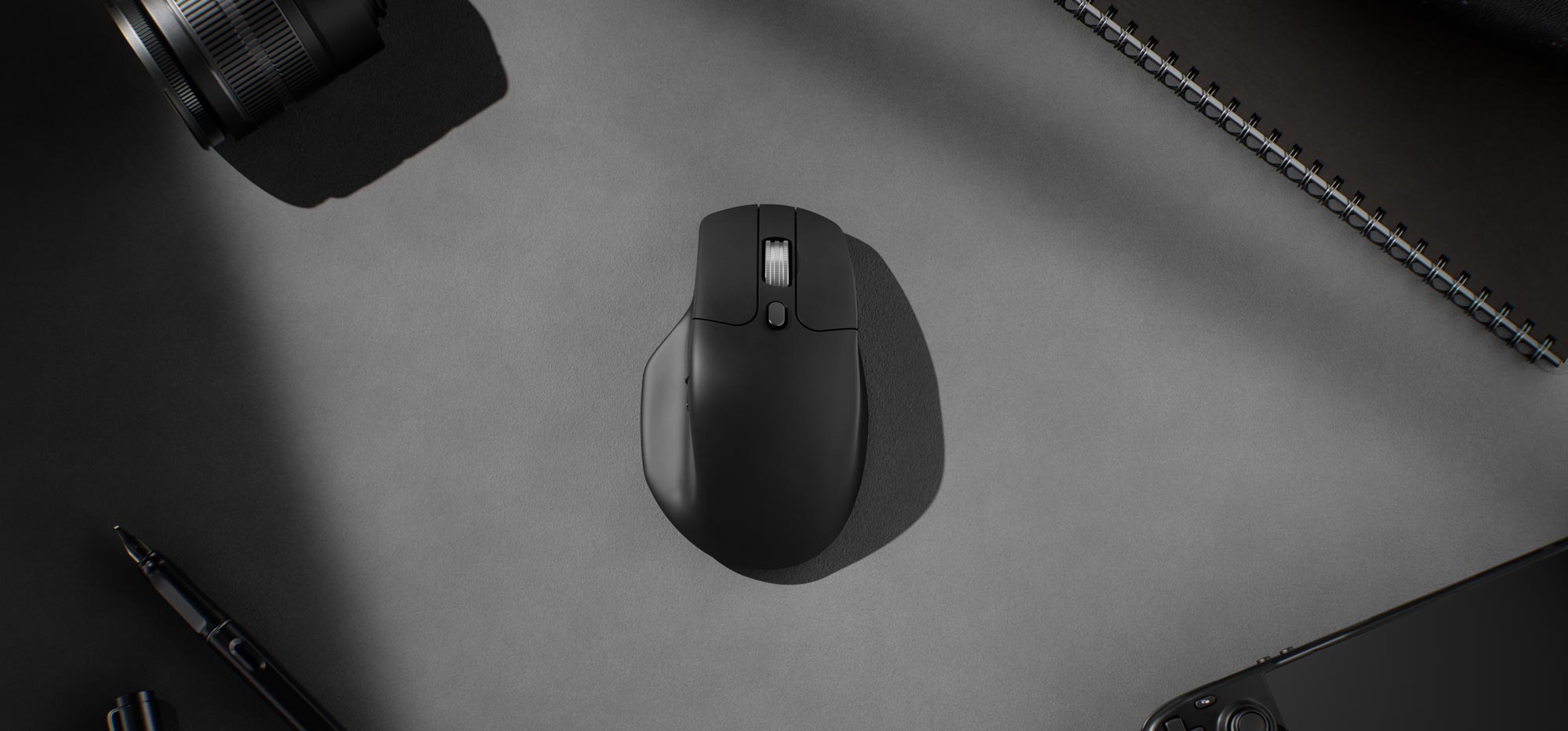
Best for: Office users, spreadsheet-heavy workflows, programmers, editors, and right-handed users who value horizontal and fast scrolling
A right-handed wireless mouse with a thumb wheel, dual-mode top scroll wheel, multiple programmable buttons, Bluetooth, 2.4GHz, wired operation, and several sensor options.
Our review
The M6 is the most practical non-keyboard product in Keychron's range. Its horizontal thumb wheel and switchable precision or infinite top scrolling suit large documents, spreadsheets, editing timelines, and long web pages. The current lineup spans several sensors and polling rates, so buyers should verify whether they need the premium 8K model or a less expensive 1K configuration.
What stands out
- Dedicated horizontal thumb wheel
- Precision and infinite top-scroll modes
- 2.4GHz, Bluetooth 5.3, and wired connectivity
- Several sensor, polling-rate, and switch configurations
Keep in mind
- Right-handed shape is not ideal for left-handed users
- Top-priced 8K model may be unnecessary for normal office work
- Variant selection is more complex than a standard office mouse
- Comfort depends on hand size and grip style
- Selected sensor
- PixArt 3950
- Selected polling rate
- Up to 8,000Hz
- Maximum DPI
- Up to 30,000 on the selected 3950 version
- Connectivity
- 2.4GHz, Bluetooth 5.3, and USB wired
- Weight
- Approximately 86g
Affiliate link. We may earn a commission at no extra cost to you.
Best affordable everyday keyboard
Keychron B1 Pro Ultra-Slim Wireless Keyboard
by Keychron

Best for: Students, travelers, office workers, and multi-device users who want a quiet and inexpensive slim keyboard
A thin and lightweight 75% wireless keyboard with quiet scissor-style keys, 2.4GHz, Bluetooth, wired mode, ZMK customization, and a protective silicone skin.
Our review
The B1 Pro is the easiest Keychron product to recommend to a general office user. It avoids mechanical-switch complexity, costs much less than the custom series, and supports several devices. Its published battery life is unusually long, and the included washable silicone skin is practical for travel and shared workspaces. It does not provide the deep switch customization or heavy construction of Keychron's mechanical keyboards.
What stands out
- Low purchase price and simple everyday design
- 2.4GHz, Bluetooth, and wired modes
- Up to 1,200 hours of published battery life
- Lightweight body and included protective silicone skin
Keep in mind
- Not a mechanical or hot-swappable keyboard
- 75% layout removes the number pad
- ABS construction feels less premium than Q-series aluminum
- Fast typists should evaluate the key feel and rollover behavior
- Layout
- 75% compact
- Connectivity
- 2.4GHz, Bluetooth 5.2, and USB-C
- Polling rate
- 1,000Hz in 2.4GHz and wired modes
- Battery
- 800mAh; up to 1,200 hours published
- Customization
- ZMK through Keychron Launcher
Affiliate link. We may earn a commission at no extra cost to you.
What this Keychron review covers
Keychron is best known for mechanical keyboards, but its current catalog also includes magnetic-switch keyboards, low-profile and ultra-slim models, ergonomic layouts, number pads, mice, switches, keycaps, cables, palm rests, carrying cases, and other desk accessories. The brand spans affordable wireless office products, enthusiast custom keyboards, gaming-focused Hall-effect models, and full-metal premium designs.
This review focuses on the buying decision: product-series differences, layout and switch selection, wireless connectivity, hot-swapping, Keychron Launcher customization, current prices, shipping, returns, warranty coverage, and four representative products. It is a research-based editorial review using Keychron's official product, policy, support, and software pages rather than a claim of independent long-term testing by PlainlyPicked.
Understanding the Keychron product families
Keychron's range is easier to understand when separated by construction and intended user. The Q series emphasizes full CNC aluminum cases and enthusiast-level customization. K-series products cover mainstream wireless mechanical and low-profile keyboards. B-series models are thin, lightweight, and comparatively affordable. HE models use magnetic switches with adjustable actuation and rapid-trigger functions, while Lemokey products lean more strongly toward gaming and performance.
Several layouts are available, including compact 60%, 65%, 75%, tenkeyless, 96%, full-size, Alice-style, split, southpaw, and separate number-pad formats. The buyer should select the layout first because size affects portability, dedicated navigation keys, function rows, number-pad access, and desk space more than switch color alone.
Mechanical, low-profile, and magnetic switches
Traditional hot-swappable Keychron boards may accept many three-pin and five-pin MX-style mechanical switches, depending on the exact model and PCB. Low-profile keyboards use a different switch format, and compatibility is more restricted. Magnetic HE boards are more specialized: the K2 HE, for example, is compatible with Keychron's stated Gateron double-rail magnetic switch system rather than ordinary mechanical switches or every magnetic switch on the market.
Magnetic switches add adjustable actuation, rapid trigger, analog-style input, and multiple actions based on press depth. These features can be useful for competitive games and specialized shortcuts, but they also require software setup and provide less universal switch compatibility than a standard MX hot-swap board.
Wireless connectivity and device switching
Many current Keychron keyboards support three connection methods: low-latency 2.4GHz wireless, Bluetooth for switching among several devices, and USB-C wired operation. Selected products provide a 1,000Hz polling rate in 2.4GHz and wired modes, while newer performance variants may offer higher rates. Bluetooth generally uses a lower polling rate but is convenient for phones, tablets, and multi-device office setups.
Wireless performance depends on receiver placement, interference, firmware, battery condition, operating system, and the exact product revision. Users who need the most consistent latency should keep the receiver close to the desk and retain wired mode as a troubleshooting option.
Keychron Launcher and customization
Keychron Launcher is a browser-based configuration tool used for remapping keys, creating macros, adjusting lighting, managing layers, and configuring HE functions on supported products. The company directs users to current Chrome, Edge, or Opera versions and may require a wired connection or receiver connection for device access.
The web-based approach avoids installing a large desktop application, but browser permissions, firmware versions, and model support can affect the experience. Firmware should not be flashed casually. Keychron's support pages warn users to follow model-specific instructions and avoid disconnecting the device during an update.
Build quality, portability, and ergonomics
Keychron covers very different physical experiences. A Q1 Max is a heavy aluminum desktop keyboard designed to feel stable and substantial. A B1 Pro is an ultra-slim portable keyboard intended for travel and everyday productivity. The K2 HE combines a compact layout with an aluminum-and-wood design, while the M6 mouse adds horizontal scrolling and an ergonomic right-handed shape.
No single construction style is best for every buyer. Full-metal keyboards can feel premium but are heavy to carry. Tall mechanical cases may benefit from a palm rest. Compact layouts save space but remove dedicated keys, and right-handed ergonomic mice may not suit left-handed users or every hand size.
Pricing and overall value
Keychron spans a wide price range. The B1 Pro is positioned as an affordable everyday keyboard, while the Q1 Max costs several times more because of its aluminum construction, gasket structure, acoustic materials, hot-swap PCB, and enthusiast-oriented design. Magnetic-switch boards carry a performance premium, and mice vary in price according to sensor, polling rate, scroll wheel, and switch configuration.
Buyers should compare the exact variant rather than only the product name. Fully assembled and barebone models, aluminum frames, backlight options, switch types, keycap sets, sensor versions, polling rates, and regional layouts can change the price and included components. Prices below were checked on July 30, 2026 and may change with stock, sales, and configuration.
Shipping, returns, and warranty
Keychron ships to many regions, but warehouse location, shipping fee, estimated delivery, customs requirements, duties, and available products vary by destination. Some current U.S.-warehouse product pages display free shipping or delivery estimates, while international shipments may originate elsewhere and can involve import taxes.
For non-quality returns outside special regional consumer rights, Keychron's current return policy generally requires a request within seven days of delivery and places return shipping costs on the customer. The policy also states that original outbound shipping is not refunded. European Union consumers have separate withdrawal rights described on the policy page.
The general warranty period is 12 months unless another period is explicitly stated. Keycaps and palm rests are listed with three months of coverage. For highly customizable series, warranty service may involve replacement of defective parts rather than replacement of the entire keyboard. Damage caused by unauthorized modification, improper installation, misuse, or non-factory repairs is excluded.
Who should consider Keychron
Keychron is most relevant to Mac, Windows, and Linux users who want more layout, switch, connectivity, and customization choices than a conventional office keyboard brand provides. It is also a strong fit for buyers who may change keycaps or switches later, want a browser-based remapping tool, or need one keyboard to move between a computer, tablet, and phone.
Who should compare alternatives
Compare alternatives if a long no-questions-asked return window, local walk-in warranty service, simple one-model purchasing, or completely maintenance-free software is the priority. Buyers who do not want to research switch compatibility, layout differences, firmware, or regional keycaps may prefer a simpler mainstream peripheral ecosystem.
Final verdict
Keychron's main strength is choice. The company serves office users, travelers, programmers, creators, keyboard enthusiasts, and gamers without forcing all of them into the same chassis or switch technology. The Q1 Max demonstrates the premium custom side, the K2 HE adds magnetic gaming features, the M6 expands the ecosystem into productivity mice, and the B1 Pro provides a much more accessible everyday option.
The main tradeoff is complexity. Model names, variants, layouts, switches, barebone choices, regional stores, and firmware support require careful checking. Choose the intended layout and use case first, verify the exact compatibility and return terms, and purchase the configuration shown on the final product and checkout pages.
The brand-level tradeoffs
Why consider Keychron
- Exceptionally broad layout and price selection
- Many hot-swappable and programmable models
- Strong compatibility across major desktop operating systems
- Useful combination of 2.4GHz, Bluetooth, and wired modes
- Large ecosystem of switches, keycaps, accessories, and replacement components
Reasons to compare alternatives
- Series names and variant choices can be confusing
- Return window for change-of-mind purchases is relatively short
- Customer may pay substantial return shipping
- Full-metal keyboards can be heavy and less portable
- Firmware, browser, and switch compatibility require model-specific checking
Brand facts at a glance
| Core product groups | Mechanical, magnetic, low-profile, ultra-slim, ergonomic, split, custom, and gaming keyboards plus mice and accessories |
|---|---|
| Main connection options | 2.4GHz wireless, Bluetooth, and USB-C wired on many current models |
| Configuration software | Keychron Launcher browser app on supported keyboards and mice |
| General warranty | 12 months unless a product document states otherwise |
| Keycaps and palm rests | Three-month warranty listed in the current general policy |
| Standard non-quality return request | Generally within seven days of delivery, with return shipping paid by the customer |
See Also
Official brand, product, software, sustainability, and support resources.