
Brand overview
What SciSummary does well—and where it fits
SciSummary combines academic-paper summarization, customizable output, inline citations, document chat, multi-document synthesis, figure and table analysis, citation tools, Zotero importing, semantic search, folders, tags, and recommended reading.
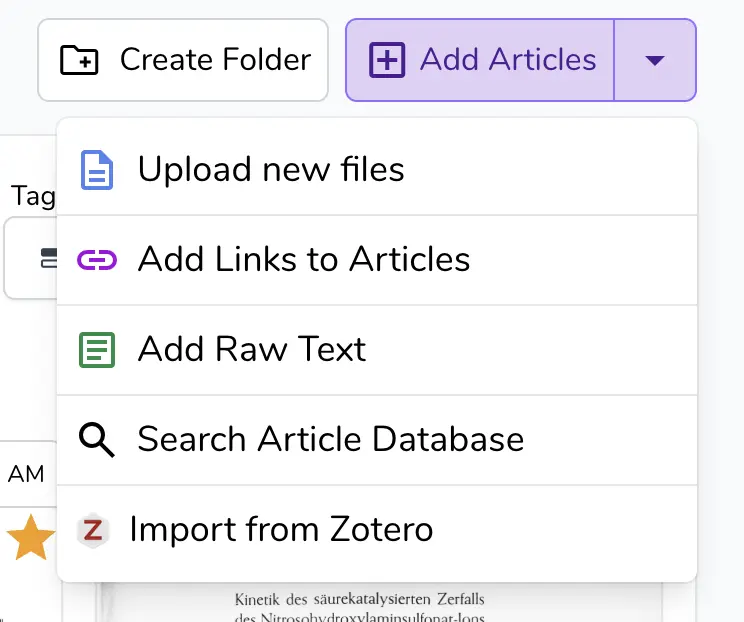
- Upload files, add public links, paste raw text, import from Zotero, or search for papers
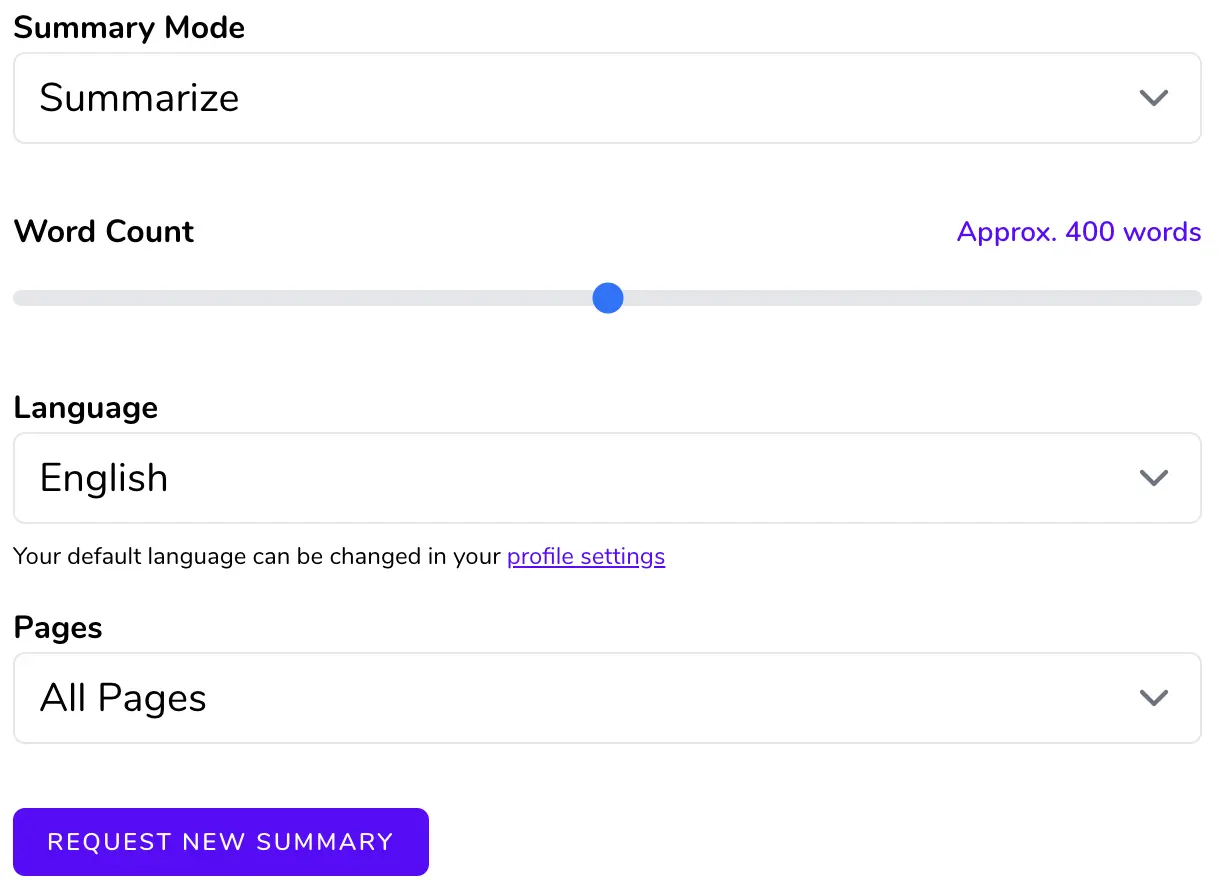
- Structured summaries with adjustable length, format, language, and page range
- Inline citations linking generated statements to locations in the source document
- Batch, combine, compare, and chat across multiple research papers
- Automatic figure and table extraction plus research-library organization
SciSummary product lineup
The 4 standout products in this brand review
These products show how the brand performs across different needs and price points. Each receives its own rating, price reference, strengths, limitations, and offer link.
Best complete plan
SciSummary Pro Plan
by SciSummary
Best for: Regular research-paper readers who want the full summarization, chat, figure, library, and multi-document feature set
The paid subscription with unlimited summaries, AI figure analysis, chat messages, article searches, quick imports, and semantic search across an indexed research library.
Our review
The Pro Plan provides the full SciSummary workflow without the trial’s word, figure, and chat limits. It is strongest for users who read papers throughout the year and will use multi-document research, figure analysis, and library search regularly. Monthly billing provides flexibility, while annual billing has the lower effective cost.
What stands out
- Unlimited summaries after payment while subscription remains active
- Unlimited AI-analyzed figures and document chat
- Unlimited article search and quick import
- Semantic search across up to 1,000 indexed documents
Keep in mind
- Annual discount requires full upfront payment
- AI output still requires source verification
- No offline processing mode
- Uploaded confidential material may require institutional approval
- Monthly billing
- $7 per month
- Annual billing
- $48 per year
- Trial
- 7 days
- Semantic-search capacity
- Up to 1,000 indexed documents
- Core access
- Unlimited summaries, figures, chat, searches, and quick imports
Affiliate link. We may earn a commission at no extra cost to you.
Best everyday feature
Structured Article Summaries
by SciSummary
Best for: Students and professionals who need to screen long papers quickly while retaining a path back to the original text
A configurable summarization workflow for uploaded files, article links, raw text, Zotero imports, and papers found through SciSummary’s database.
Our review
Structured summaries are the most immediately useful feature. Users can select the summary mode, approximate length, output language, and page range instead of accepting a single generic result. Inline citations make it easier to return to the original source, although the summary should still be treated as a reading aid rather than an authoritative substitute.
What stands out
- Several input methods including Zotero
- Adjustable summary length, mode, language, and page range
- Inline citations support source checking
- Supports more than 130 languages
Keep in mind
- Generated summaries can omit context or contain errors
- Quality depends on the source document and extraction
- A summary cannot replace full methodological review
- Large or poorly formatted files may produce unexpected results
- Inputs
- File, public URL, raw text, Zotero import, or database search
- Maximum file size
- 200MB
- Languages
- More than 130
- Customization
- Mode, word count, language, and page range
- Verification
- Inline citations to source locations
Affiliate link. We may earn a commission at no extra cost to you.
Best for literature reviews
Multi-Document Research
by SciSummary
Best for: Researchers preparing literature reviews, reading lists, topic overviews, or early comparisons across related studies
Tools for batch-summarizing papers, combining multiple sources, comparing selected sections, and chatting across a group of documents.
Our review
The multi-document workspace is where SciSummary becomes more useful than a basic PDF summarizer. It can process large batches, build a unified summary from selected papers, and compare methods or findings across documents. The tools are valuable for screening and orientation, but formal evidence synthesis still requires a transparent human-led review process.
What stands out
- Large batch-summarization limit
- Combined and individual summaries can be generated together
- Section-level or full-paper comparison
- Multi-document chat supports cross-referencing
Keep in mind
- Does not automate research-quality assessment
- Combined outputs can flatten disagreement between studies
- Source selection and bias review remain the user’s responsibility
- Large projects still require careful organization and checking
- Batch summarization
- Up to 200 documents
- Combined summary
- Up to 25 documents
- Paper comparison
- Up to 10 documents
- Comparison scope
- Entire papers or selected sections
- Interaction
- Chat with multiple articles
Affiliate link. We may earn a commission at no extra cost to you.
Best visual research tool
Figure and Table Analysis
by SciSummary
Best for: Readers working with chart-heavy, statistical, engineering, biomedical, and data-driven research papers
Automatic extraction and contextual AI analysis of figures, tables, charts, graphs, and diagrams from research papers.
Our review
Figure analysis is useful for papers where the main result is communicated visually. SciSummary can extract visuals, explain them in context, and answer follow-up questions. This can accelerate comprehension, but statistical interpretation and study-design conclusions should still be checked against captions, methods, results, and supplementary material.
What stands out
- Automatically extracts many figures and tables
- Explains visuals using the surrounding document context
- Supports questions about individual figures
- Missing visuals can be uploaded manually
Keep in mind
- AI may misread axes, statistics, legends, or causality
- Extraction may miss or distort difficult figures
- Does not replace statistical expertise
- Important claims should be verified in the complete paper
- Supported visuals
- Tables, charts, graphs, diagrams, and other figures
- Interaction
- Contextual explanation and follow-up questions
- Manual addition
- PNG, JPG, or PDF figures can be uploaded
- Trial allowance
- 5 AI-analyzed figures
- Pro allowance
- Unlimited
Affiliate link. We may earn a commission at no extra cost to you.
What this SciSummary review covers
SciSummary is an AI research assistant designed for scientific papers, academic articles, technical reports, and literature-review workflows. It can summarize individual documents, organize papers in a personal library, chat with uploaded articles, analyze figures and tables, compare multiple papers, combine several documents into one summary, generate citations, and suggest related reading.
This review focuses on the buying decision: supported input methods, summary customization, multi-document limits, citation support, research organization, current Pro pricing, the seven-day trial, subscription cancellation, privacy considerations, and the limitations of relying on language models for academic work.
Adding and summarizing research papers
SciSummary accepts uploaded files, public article links, raw text, Zotero imports, and papers found through its article database. The interface lets users select a summary mode, approximate length, output language, and specific page range. The documentation currently states support for more than 130 languages and a maximum uploaded file size of 200MB.
The structured workflow is useful for readers who do not want a generic paragraph summary. Available modes include a general summary, section-by-section output, and other formats intended for different reading or communication goals. Users should still compare important statements with the original paper rather than treating the generated summary as a replacement for it.
Citations and accuracy controls
SciSummary states that summaries and document-chat answers include citations linking to the relevant location in the original paper. This is one of the platform's most valuable features because it gives users a path back to the source text instead of presenting an unsupported answer alone.
The company also explicitly acknowledges that large language models can produce incorrect results. Inline citations reduce the verification burden, but they do not guarantee that every interpretation, numerical statement, methodological conclusion, or causal claim is correct. High-stakes academic, clinical, legal, or technical work should be checked against the complete source and, where necessary, reviewed by a qualified expert.
Multi-document research workflows
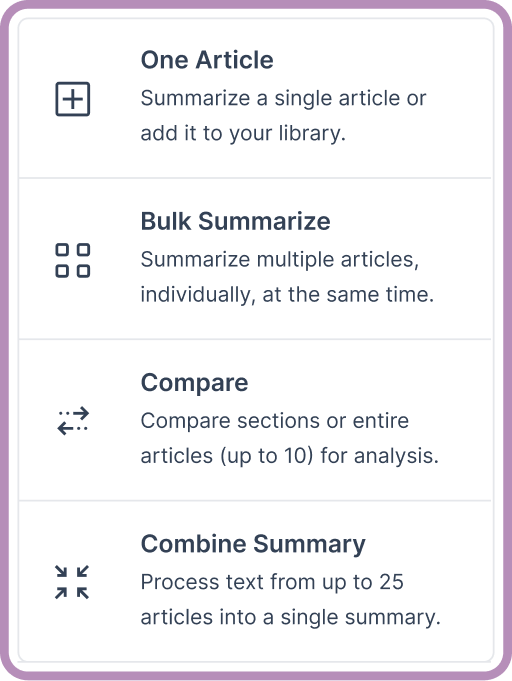
SciSummary supports several different multi-paper actions. Its current documentation says users can batch-summarize as many as 200 documents, combine up to 25 documents into one unified summary, and compare up to 10 documents by full text or selected sections. Users can also chat with multiple articles and work with groups of papers inside folders.
These tools are most useful for early literature-review screening, identifying recurring themes, comparing methods, and preparing a reading shortlist. They should not be treated as an automated systematic-review process because study selection, quality assessment, bias analysis, data extraction, and final synthesis still require human judgment.
Figure and table analysis
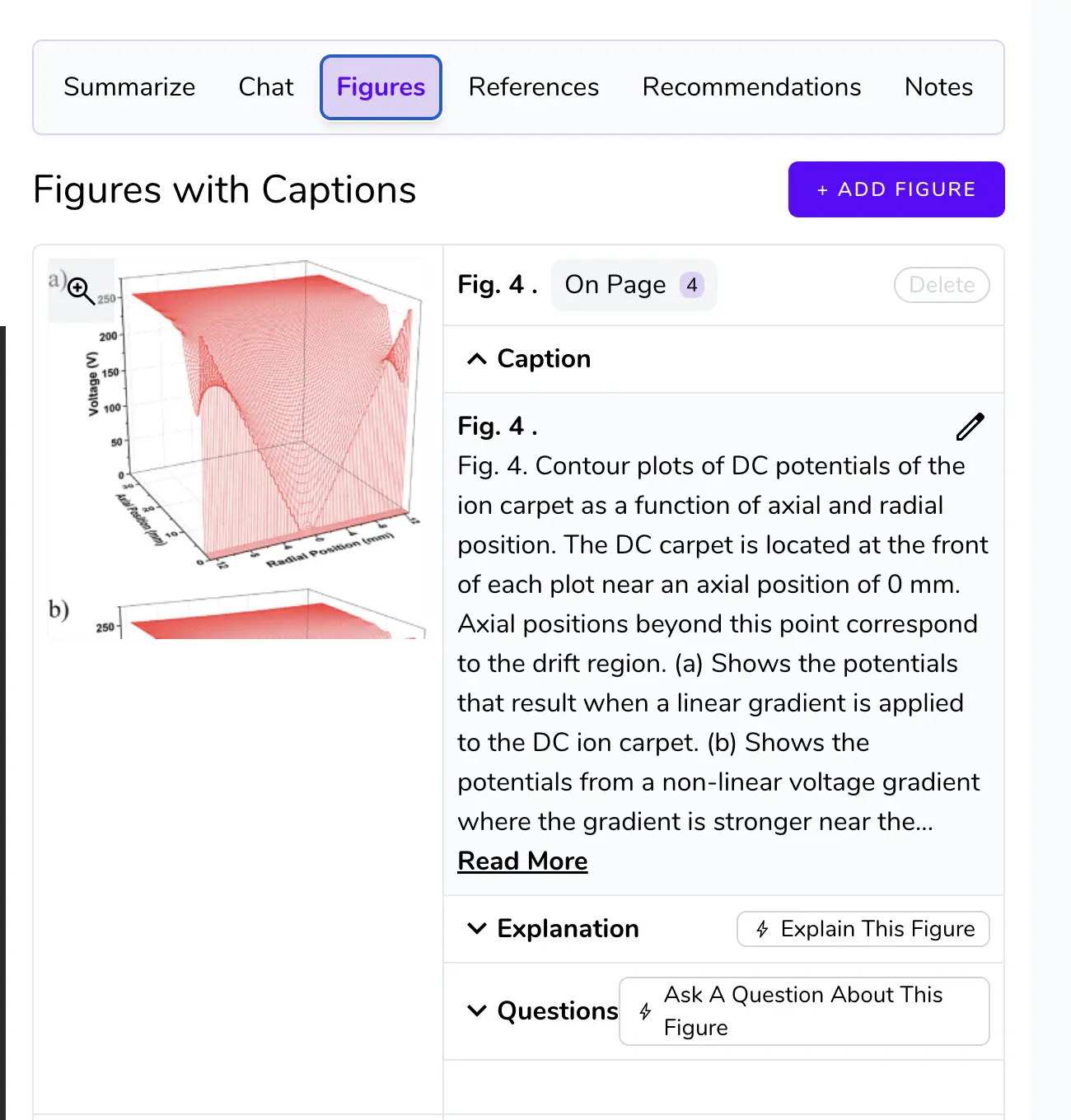
The platform automatically extracts figures, tables, graphs, charts, and diagrams from uploaded papers. Users can request contextual explanations, ask questions about a visual, and manually upload a missing figure when automatic extraction is incomplete.
This can save time when a paper's most important evidence appears in a chart or statistical table. However, AI explanations of p-values, confidence intervals, effect sizes, axes, legends, or model outputs should be checked carefully. A visually convincing explanation can still misread the study design or the relationship between the figure and the surrounding text.
Research library and organization
SciSummary includes folders, tags, color coding, search, notes, recommendations, and batch actions. Papers can be grouped by project, research question, course, client, or priority. Folder tools allow users to summarize selected articles, combine their contents, compare papers, or begin a multi-document chat from the same workspace.
The Pro plan also lists semantic search across a library of up to 1,000 indexed documents. This makes SciSummary closer to a lightweight AI reference workspace than a single-use PDF summarizer, although researchers who already maintain a mature Zotero, EndNote, Mendeley, or institutional workflow should test whether the additional library is worth maintaining.
Pricing and free access
When checked on July 30, 2026, SciSummary listed a seven-day free trial with 30,000 words of summaries, five AI-analyzed figures, 100 chat messages, unlimited article searches, and up to 50 quick-import papers. The FAQ says non-AI organizational features may remain available without entering a card.
The Pro plan was listed at $7 per month with monthly billing or an effective $4 per month when billed as $48 per year. The current homepage also displayed a student promotion providing the first month at no cost with code STUDENT26. Promotions and plan limits can change, so the checkout page should be reviewed before subscribing.
Subscription and cancellation
SciSummary's terms allow recurring subscription charges until cancellation. Users can cancel by logging into the account, and cancellation takes effect at the end of the current paid term. The public terms do not present a broad guaranteed refund policy; dissatisfied users are directed to contact support.
Anyone testing the service for a short project should record the renewal date and confirm cancellation from the account before the next billing period. Annual billing offers the lower effective monthly cost but requires the full yearly payment upfront.
Privacy and uploaded research
The privacy policy states that SciSummary collects account information and usage data and may use third-party providers for functions such as payments and email. Because the service processes uploaded documents, researchers should avoid uploading unpublished, confidential, personally identifiable, contract-restricted, or patient-related materials unless their institution and the applicable data policy permit it.
The public privacy policy should be reviewed alongside any institutional research-data rules. A consumer privacy policy does not automatically satisfy university, employer, clinical, governmental, or regulated-data requirements.
Who should consider SciSummary
SciSummary is most useful for students, researchers, analysts, science communicators, and professionals who regularly read long technical documents and want structured summaries with source-linked citations. The strongest use cases are paper screening, literature-review preparation, multi-document comparison, figure interpretation, and maintaining a searchable research library.
Who should compare alternatives
Compare alternatives if the main requirement is academic writing generation, full systematic-review automation, collaborative manuscript editing, institutional reference management, or guaranteed on-premises data processing. Occasional users who only summarize a small number of short PDFs may also find that a general AI assistant or a free PDF tool is sufficient.
Final verdict
SciSummary is more complete than a basic paper summarizer. Structured output, inline citations, document chat, multi-paper synthesis, figure analysis, Zotero importing, and library organization create a coherent research workflow. The annual Pro price is comparatively accessible for users who will use the service throughout the year.
The central limitation is the same one affecting every AI research assistant: generated text can be incomplete or wrong. SciSummary is best used to accelerate reading and navigation, not to replace the original paper, statistical judgment, source evaluation, or expert review.
The brand-level tradeoffs
Why consider SciSummary
- Built specifically for scientific and academic documents
- Source-linked citations make verification easier
- Strong multi-document and literature-review screening tools
- Useful figure, table, folder, tag, and semantic-search features
- Accessible monthly and annual Pro pricing
Reasons to compare alternatives
- AI summaries and explanations can still be incorrect
- Not a replacement for reading methods, results, and limitations
- Requires an internet connection for active use
- Confidential documents require careful privacy and institutional review
- Annual savings require paying the full year upfront
Brand facts at a glance
| Free trial | 7 days with 30,000 summary words, 5 AI-analyzed figures, and 100 chat messages |
|---|---|
| Pro monthly price | $7 per month when billed monthly |
| Pro annual price | $48 per year, equivalent to $4 per month |
| Multi-document limits | Batch up to 200, combine up to 25, and compare up to 10 documents |
| Languages | More than 130 supported output languages |
| Cancellation | Cancel from the account; access continues until the end of the current paid term |
See Also
Official brand, product, software, sustainability, and support resources.